
Add people to a render
Add people to an architectural render
Upload a render and run Add people: ArchFor places three to six people at the scale your camera height implies, in four different arrangements. You need no cutout library and no Photoshop masking.
- 3 to 6 people per image, scaled to the camera height
- People are placed to keep entrances clear, and none look at the camera
- 4 options per round; 8 credits at 2K
Updated November 3, 2026
Before and after
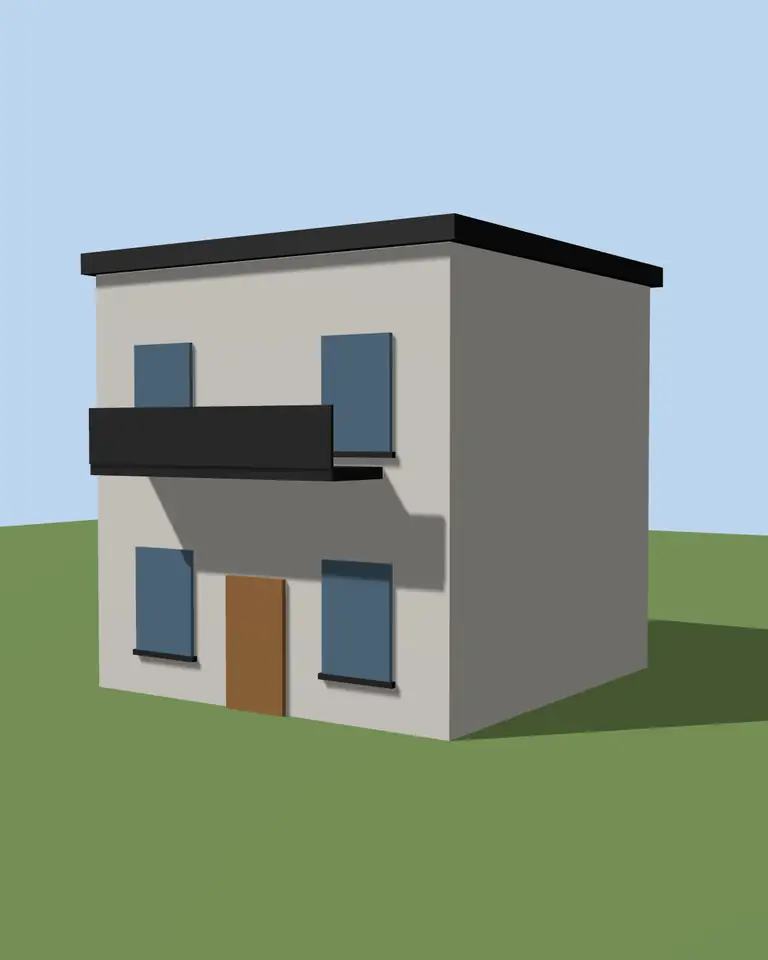
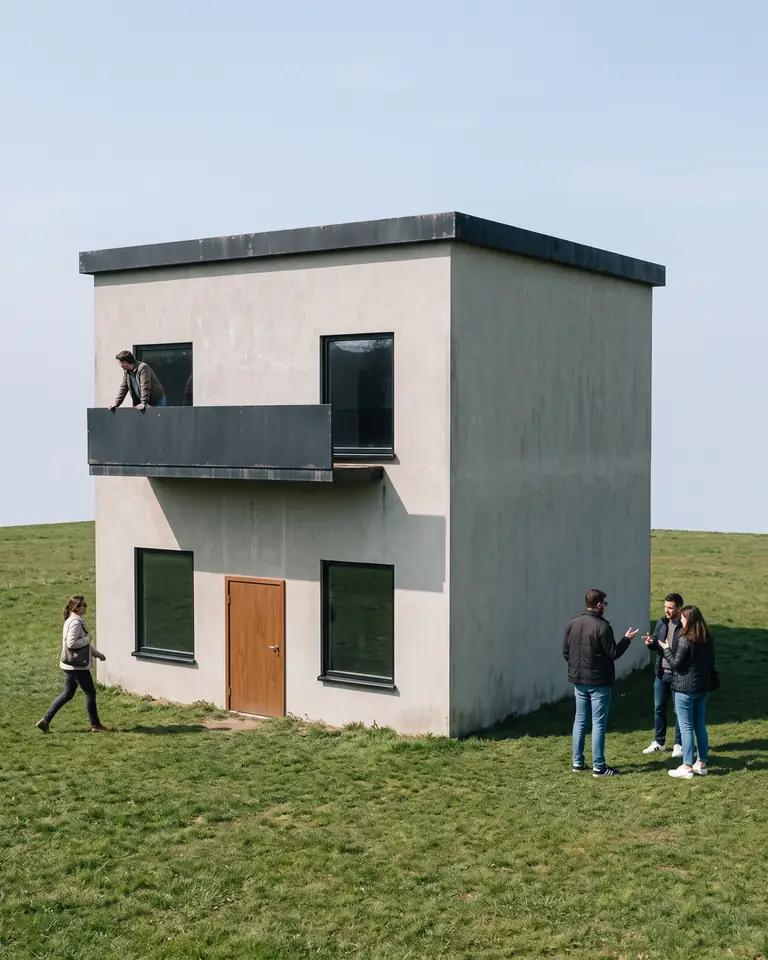
Test model, Nano Banana 2.1 at 2K, not retouched. How we tested
Three steps, nothing to set up
- 01
Export your render
Save a still from Enscape, Lumion, Twinmotion, D5 or any renderer as JPG or PNG.
- 02
Pick one change
Photoreal, golden hour, night, people, planting, sky or winter, and how far it may go.
- 03
Choose from four options
Download one, or apply the next change to it, for example Photoreal and then Night.
How does ArchFor place people in a render?
The people recipe follows fixed rules, so the figures support the building instead of competing with it.
- Three to six people, never a crowd.
- Scale set by the camera height, so an eye-level view puts heads near the horizon.
- Walking or standing naturally along paths and terraces.
- Neutral everyday clothing with no logos or loud colors.
- Nobody blocking an entrance.
- Nobody looking at the camera; faces small and natural.
Why does camera height decide the scale?
Camera height matters more than distance. With an eye-level camera of about 1.6 m, heads line up along the horizon at any distance. From a drone view the figures shrink and carry less detail. A camera at knee height makes people tower over the frame, so raise it before export if you want them as scale figures. Correctly scaled figures also show a client how a forecourt or terrace is meant to be used.
Add people, or Add people & planting?
Add people is an action you pick before generating. Add people & planting is an adjustment on a finished result: it adds the same kind of people plus grasses, shrubs and a few trees, with fewer additions than either change alone.
| Add people | Add people & planting | |
|---|---|---|
| Where you find it | Action on the upload form | Adjustment on a result |
| What it adds | 3 to 6 people | People and planting, fewer of each |
| Best for | Planting already finished | Bare sites and new renders |
How to add people to a render
Work on your final image. People added before a later action may change in the next step, so add them last, after light, sky and season are settled.
- Finish the render first, for example with Make it photoreal or Night.
- Upload it as JPG, PNG or WebP under 10 MB.
- Choose Add people and keep Balanced.
- Pick the arrangement you like from four options, or click More like this for four more.
What are the limits?
You cannot place a person on a chosen spot or ask for a specific age or activity. Hands and faces are small on purpose, and close-up figures can look off; check them at full size. Text on clothing or bags is unreliable.
Add people does not repaint the building. If the render still looks computer-made, run Make it photoreal first; people added to a flat real-time image tend to look pasted in.
ArchFor is a web app that turns 3D model screenshots, sketches and existing renders into photorealistic architectural images. Credit packs from $9.99; no plugin and no subscription required.
ArchFor at a glance
- What it is
- ArchFor is a web app that turns 3D model screenshots, sketches and existing renders into photorealistic architectural images. Credit packs from $9.99; no plugin and no subscription required.
- Inputs
- One JPG, PNG or WebP up to 10 MB, exported from any renderer
- Output
- Four images per click at the size you choose (1K, 2K or 4K; 2K by default), in the shape of your upload
- Time
- Usually under a minute at 2K; 4K takes a minute or more
- Price
- 1 credit per image at 1K, 2 at 2K, 3 at 4K. Packs from $9.99 for 80 credits (40 images at 2K); monthly plans from $19.99; no free tier
- Model
- Nano Banana 2.1, a Google Gemini image model (ArchFor isn't affiliated with Google)
- Privacy
- Uploads and results are private and deleted after 14 days
Pay for what you render
No subscription needed. Failed renders are refunded automatically.
Questions
Can I choose where the people go?
No. The recipe places them along paths and terraces and keeps entrances clear. If an arrangement does not suit, run More like this for four new options.
Is the scale correct?
Usually. Figures are scaled to the camera height read from your image, so eye-level views look right most often. Aerial and very wide views are harder; check the person nearest the camera against a door height.
Does it work on interiors?
Yes. People appear standing or walking in open floor areas, with the same rules: none look at the camera and none block a door. Large furniture may limit where they fit.
Will the faces look real?
They are kept small and natural, which hides most AI flaws. Do not use close-up figures as the focus of the image. These are generated people, not real individuals.
How much does adding people cost?
The same as any run: 8 credits for four images at 2K, 4 at 1K or 12 at 4K. The adjustment Add people & planting costs the same.
Will people appear on balconies or behind windows?
It can happen. Check upper floors and balconies, and run More like this if a figure looks out of place.