
Lumion render enhancer
Make Lumion renders more realistic
To make a Lumion render more realistic, upload the exported photo and run Make it photoreal at Strong. Trees, grass and materials get the variation real-time rendering leaves out, while the building geometry stays the same.
- Opens on Strong, because Lumion planting needs the most work
- Building form and openings are kept
- 4 versions per run; 8 credits at 2K
Updated November 3, 2026
Before and after
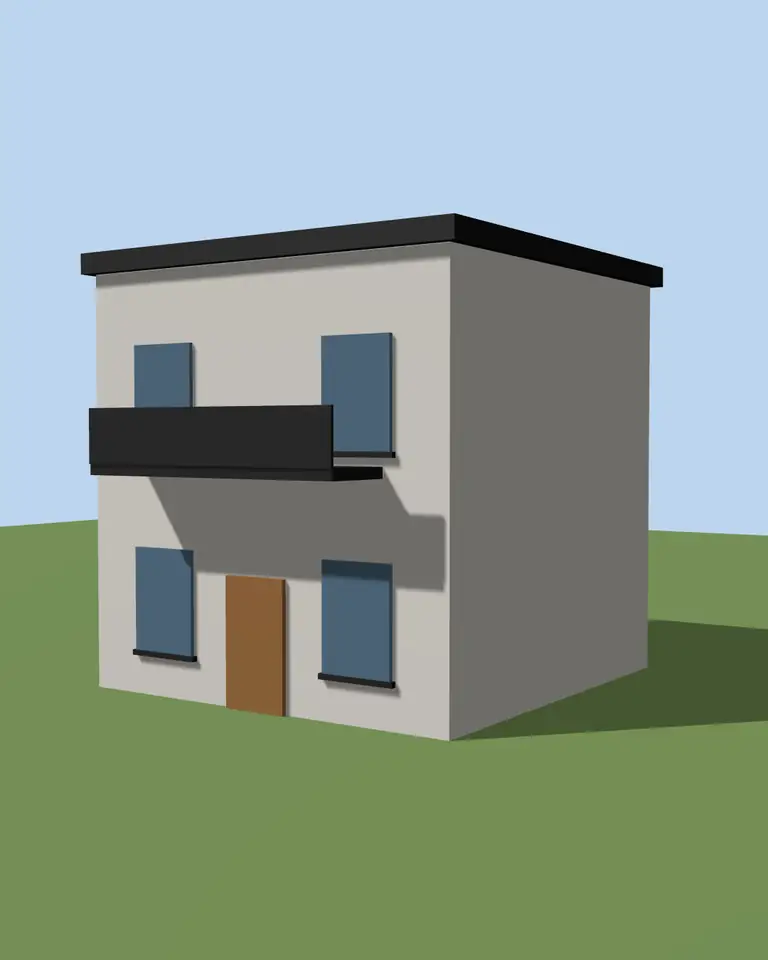
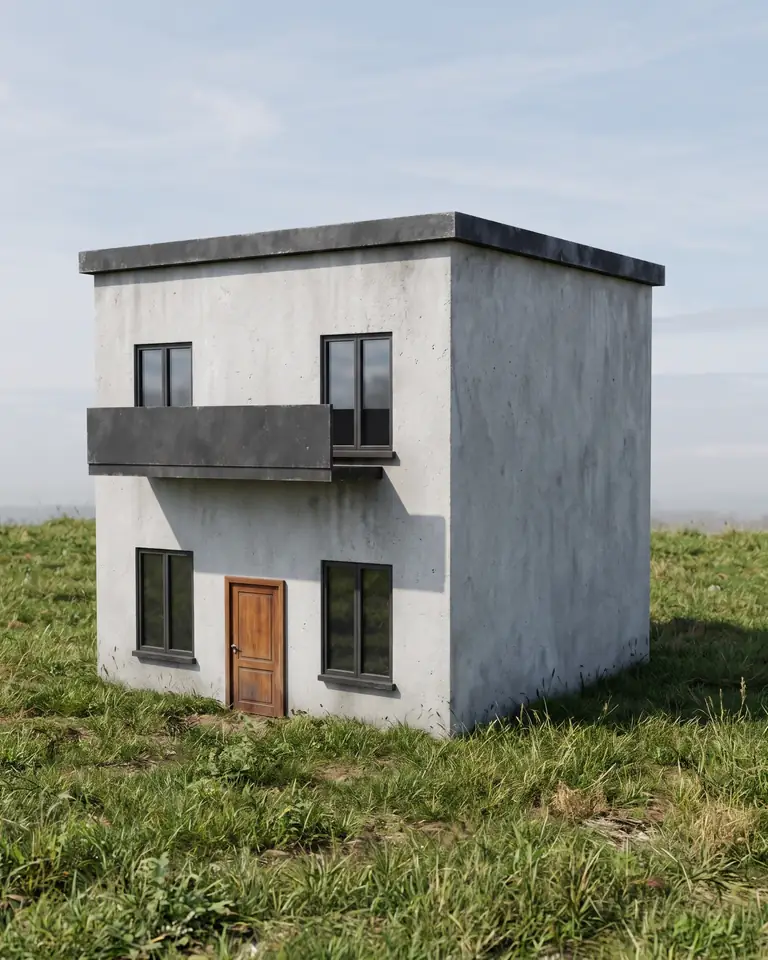
Test model, Nano Banana 2.1 at 2K, not retouched. How we tested
Three steps, nothing to set up
- 01
Export your render
Save a still from Enscape, Lumion, Twinmotion, D5 or any renderer as JPG or PNG.
- 02
Pick one change
Photoreal, golden hour, night, people, planting, sky or winter, and how far it may go.
- 03
Choose from four options
Download one, or apply the next change to it, for example Photoreal and then Night.
How to export a Lumion still for ArchFor
Render stills from Photo mode. At the time of writing, Lumion's support pages list Email (1280 x 720), Full HD, Quad HD and Print sizes for ray-traced photos, and Poster (7680 x 4320) as the largest size. Labels can differ between versions.
- Set up the view in Photo mode and save it as a photo.
- Keep effects light: heavy bloom, chromatic aberration or strong color correction get baked in and are hard for the AI to undo.
- Render at Full HD or Quad HD. ArchFor returns at most 4K, so Poster size adds file weight only.
- Save the image as JPG or PNG under 10 MB.
- Upload it here and keep Make it photoreal on Strong. Drop to Balanced if the materials must stay as chosen.
Why do trees and grass need the most help?
Real-time vegetation is built for speed. A forest of identical models renders fast, but the eye catches the repeat at once. Three faults give it away:
- Repetition: the same tree model, same size, same rotation, placed in a row.
- Uniform color: every leaf the same green, with no dry tips, no seasonal shift and no shade inside the crown.
- Hard edges: grass that ends in a sharp line at the path and hedges cut like boxes.
What does the enhancer do to Lumion planting?
The photoreal recipe asks for natural, irregular vegetation. In practice you see mixed crown sizes, darker leaves inside each tree and lawn that thins where people would walk. If the lawn reads well but the borders look bare, download the result and run Add planting on it at Balanced. It adds grasses and shrubs at the edges and keeps the facade clear.
Why Strong is the default for Lumion
Subtle and Balanced protect materials and planting as you placed them, so they cannot fix a repeated tree. Strong is allowed to reinterpret finishes and planting for a more photographic result. It still may not change the building form or its openings.
Expect the trees to change species slightly and the lawn to gain irregular edges. If a specific tree matters for the design, use Balanced and accept a more modest result.
ArchFor is a web app that turns 3D model screenshots, sketches and existing renders into photorealistic architectural images. Credit packs from $9.99; no plugin and no subscription required.
What stays exactly as you rendered it?
The camera position, lens, horizon, massing, roofline, floor count and every door and window opening come from your upload. Thin railings, mullions and signage can still shift slightly. Use the result for reviews and marketing, not as a technical drawing.
ArchFor at a glance
- What it is
- ArchFor is a web app that turns 3D model screenshots, sketches and existing renders into photorealistic architectural images. Credit packs from $9.99; no plugin and no subscription required.
- Inputs
- One JPG, PNG or WebP up to 10 MB, exported from any renderer
- Output
- Four images per click at the size you choose (1K, 2K or 4K; 2K by default), in the shape of your upload
- Time
- Usually under a minute at 2K; 4K takes a minute or more
- Price
- 1 credit per image at 1K, 2 at 2K, 3 at 4K. Packs from $9.99 for 80 credits (40 images at 2K); monthly plans from $19.99; no free tier
- Model
- Nano Banana 2.1, a Google Gemini image model (ArchFor isn't affiliated with Google)
- Privacy
- Uploads and results are private and deleted after 14 days
Pay for what you render
No subscription needed. Failed renders are refunded automatically.
Questions
Which settings should I use before export?
Keep effects moderate and render at Full HD or Quad HD. Strong color grading and bloom are baked into the pixels. A neutral, slightly underexposed photo gives the enhancer the most room.
Can I enhance a Lumion animation?
No. ArchFor works on stills only and does not support video. You can enhance a single key frame exported as an image.
Does it work with LiveSync views?
Yes, once you render a photo. LiveSync is Lumion's live link to modeling software such as SketchUp, Revit, Rhino, Archicad and Vectorworks. ArchFor does not connect to it; render a still from the synced view in Lumion and upload that.
Will Lumion people look better too?
Often, on Strong. For new people at the right scale, download your photoreal result and run Add people on it. Lumion is a trademark of its owner; ArchFor is not affiliated with it.
How much does it cost?
A round of four images costs 4 credits at 1K, 8 at 2K or 12 at 4K. Packs start at $9.99 for 80 credits, valid for 12 months.
Can I swap the Lumion sky?
Yes. Upload the render, or a downloaded result, and run Replace sky. It changes only the sky, matches the existing sun direction and updates the reflections in the glass.