
SketchUp on macOS
Render SketchUp on a Mac — no plugin, no GPU
To render SketchUp on a Mac, export the view as a PNG and upload it to ArchFor in Safari or Chrome. It runs the same on any Apple silicon or Intel Mac, because the images are generated on servers, not on your graphics chip. ArchFor is a web app that turns 3D model screenshots, sketches and existing renders into photorealistic architectural images. Credit packs from $9.99; no plugin and no subscription required.
- Works in Safari or Chrome on macOS; nothing to install in SketchUp
- Each click returns 4 options at 1K, 2K or 4K; 2K usually takes under a minute
- Upload one JPG, PNG or WebP file up to 10 MB
Updated November 3, 2026
Before and after
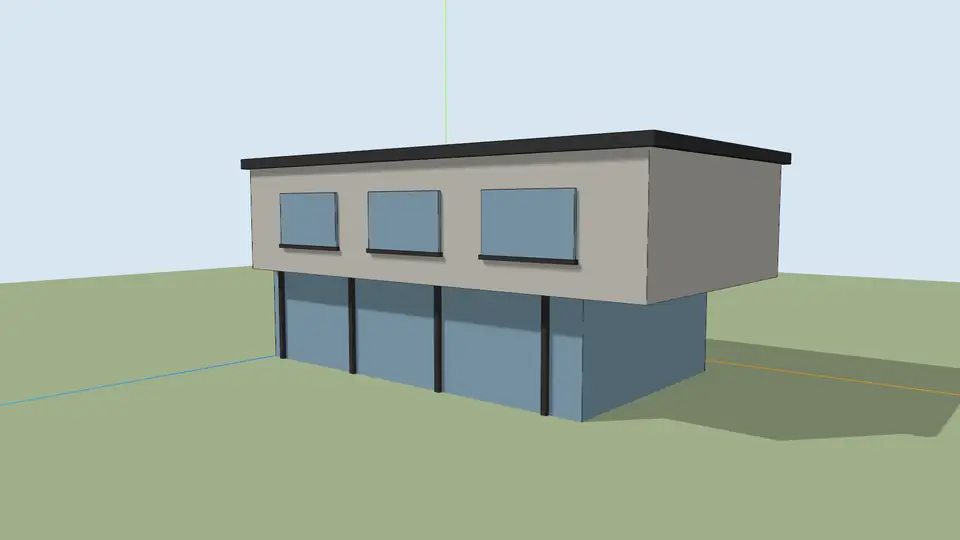
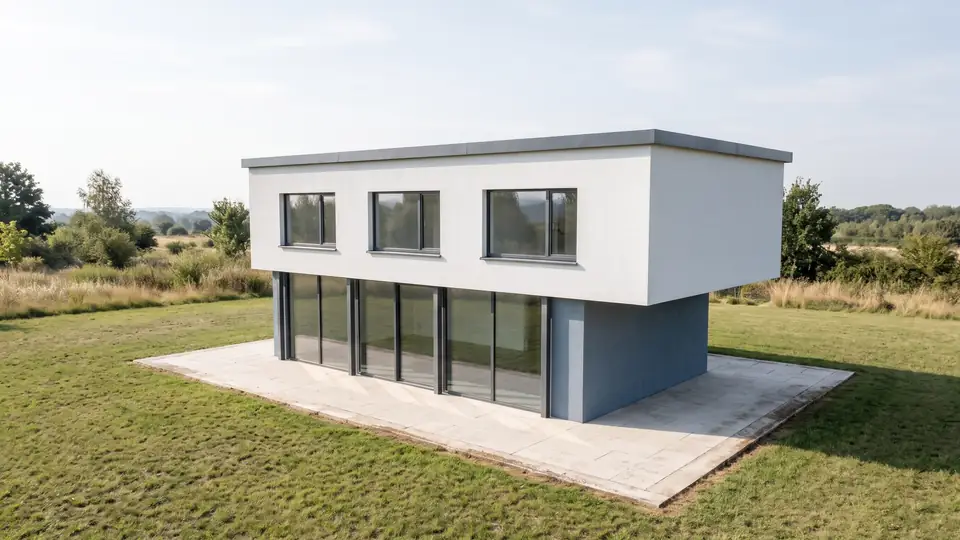
Test model, Nano Banana 2.1 at 2K, not retouched. How we tested
Three steps, nothing to set up
- 01
Screenshot your view
In SketchUp use File → Export → 2D Graphic, or just take a screenshot. Shadows on, axes and edges off.
- 02
Pick a style and a time of day
Six style presets, checked in our recipe test. Add a one-line materials note if you want.
- 03
Choose from four options
Download the one you like, or tap Brighter, Night or Add people & planting to get four more based on it.
How to export a SketchUp view on a Mac
The desktop app on macOS has a built-in image export. Use it when you want a set pixel size without the toolbars around the viewport.
- Orbit to the camera you want and save it as a scene, so you can come back to the same view later.
- Turn off View → Axes and View → Guides. ArchFor removes them anyway, but a clean view leaves less to guess.
- Choose File → Export → 2D Graphic.
- Pick PNG or JPEG as the format.
- Click Options. Clear Use View Size and type a width of about 3,000 pixels.
- Click Export, then drag the file onto the ArchFor upload box.
Can I use Cmd+Shift+4 instead of exporting?
Yes. Press Cmd+Shift+4 and drag a box around the model area only. Leave out the toolbar, the tray and the status bar. The output keeps the shape of your upload, so a tight crop gives a tight render.
Press Cmd+Shift+5 for the screenshot toolbar. Its Options menu sets where files go, such as Desktop or Clipboard. macOS saves screenshots as PNG files by default.
A Retina display saves two pixels for every point on screen. A viewport that looks 1,400 points wide becomes a file about 2,800 pixels wide. That is plenty for a 2K result. A full-screen PNG of a detailed model can pass 10 MB; crop it or export a JPEG instead.
Why do Mac users run into renderer limits?
Several desktop renderers were built around Windows graphics APIs. At the time of writing (November 2026), Lumion Pro and D5 Render have no macOS version. Enscape for Mac needs an Apple silicon chip and does not run on Intel Macs. V-Ray for SketchUp does offer a macOS build; check Chaos's system requirements for your version. These names are trademarks of their owners, and ArchFor is not affiliated with them.
ArchFor sidesteps the question. Your Mac only uploads one image and shows the results. A 2019 Intel MacBook Pro waits no longer than an M4 Mac mini.
What comes back, and what can shift?
Every click makes 4 options at the size you pick: 1K, 2K (the default) or 4K. The recipe treats your image as the authority for massing, roofline, floor count, openings, camera and horizon. It strips SketchUp's axes, section planes, selection outlines and black edge lines.
The output is a generated picture, so thin parts like glazing bars, balustrades or signs can drift. Do not use the results for construction documents. A round of 4 at 2K costs 8 credits, so the $9.99 Starter pack covers 10 rounds.
ArchFor at a glance
- What it is
- ArchFor is a web app that turns 3D model screenshots, sketches and existing renders into photorealistic architectural images. Credit packs from $9.99; no plugin and no subscription required.
- Inputs
- One JPG, PNG or WebP up to 10 MB: a model screenshot, clay model, hand sketch or elevation from any software
- Output
- Four images per click at the size you choose (1K, 2K or 4K; 2K by default), in the shape of your upload
- Time
- Usually under a minute at 2K; 4K takes a minute or more
- Price
- 1 credit per image at 1K, 2 at 2K, 3 at 4K. Packs from $9.99 for 80 credits (40 images at 2K); monthly plans from $19.99; no free tier
- Model
- Nano Banana 2.1, a Google Gemini image model (ArchFor isn't affiliated with Google)
- Privacy
- Uploads and results are private and deleted after 14 days
Pay for what you render
No subscription needed. Failed renders are refunded automatically.
Questions
Does it work with SketchUp Free?
Yes. SketchUp Free runs in a browser, and ArchFor only needs an image of the view. Export a PNG from SketchUp for Web's file menu, or take a Cmd+Shift+4 screenshot of the viewport.
Do I need an Apple silicon Mac?
No. Intel Macs work the same as Apple silicon Macs. You need a current version of Safari or Chrome and an internet connection; the rendering does not use your GPU.
How does it compare with SketchUp's own AI Render?
They are different tools for the same job. SketchUp's AI Render works inside SketchUp, uses AI credits included with a Go, Pro or Studio subscription, and on desktop installs as an extension for SketchUp 2024 or later. ArchFor is a separate web app you pay per render, with tested presets instead of written prompts, and it returns four options per click at 1K, 2K or 4K.
Is my .skp file uploaded?
No. Only the image you upload leaves your Mac. Uploads and results are stored privately, visible only to you, and deleted after 14 days.
What happens if a render fails?
The credits for a failed image come back automatically. You do not need to contact support for a refund of a failed image.