
Vectorworks Architect and Landmark
AI renders from Vectorworks views
Export your Vectorworks view with Export Image File, upload it, and ArchFor returns four photoreal renders of it. You set up no Renderworks textures, lights or backgrounds.
- Export from File > Export > Export Image File
- Shaded mode exports upload as Model screenshot
- No Renderworks license needed
Updated November 3, 2026
Before and after
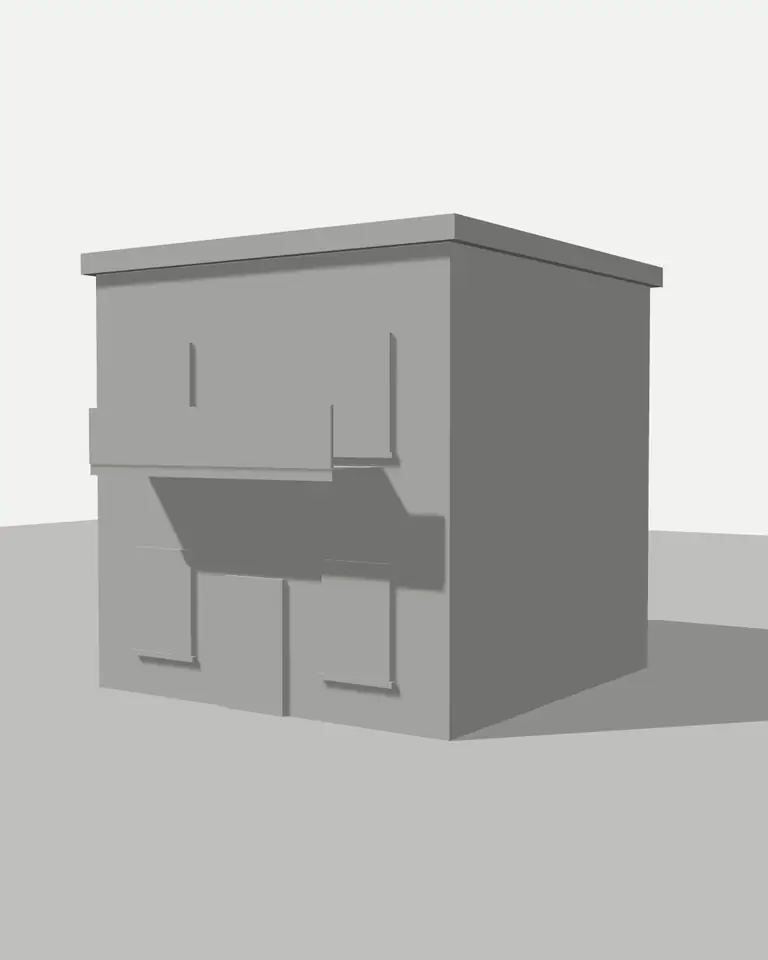
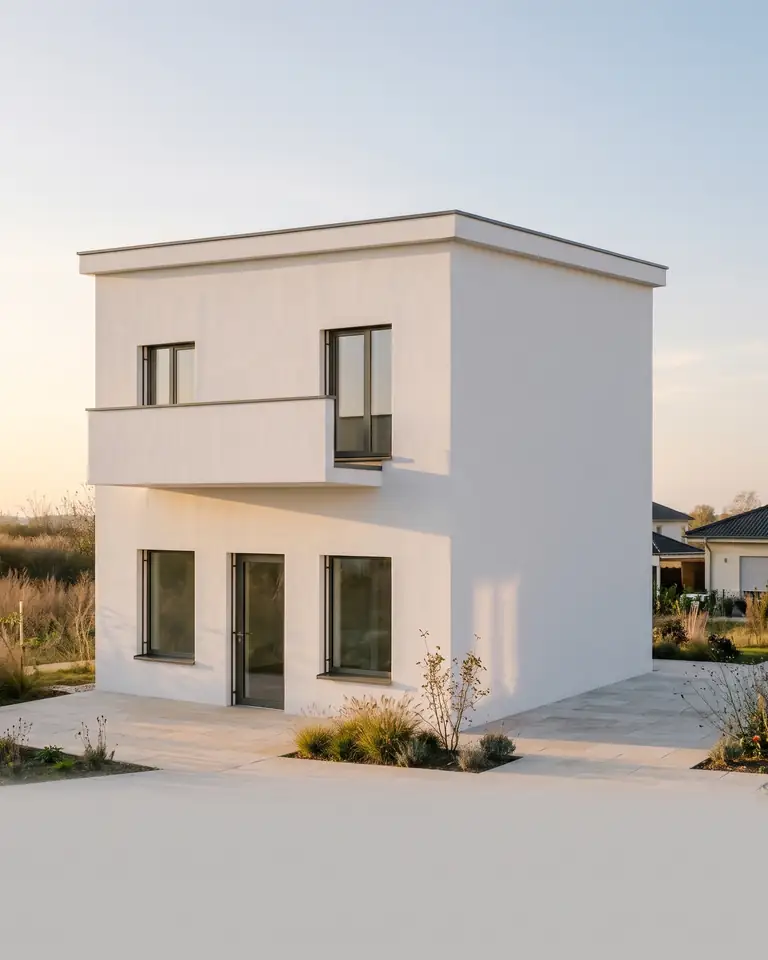
Test model, Nano Banana 2.1 at 2K, not retouched. How we tested
Three steps, nothing to set up
- 01
Screenshot your view
In SketchUp use File → Export → 2D Graphic, or just take a screenshot. Shadows on, axes and edges off.
- 02
Pick a style and a time of day
Six style presets, checked in our recipe test. Add a one-line materials note if you want.
- 03
Choose from four options
Download the one you like, or tap Brighter, Night or Add people & planting to get four more based on it.
How to export a Vectorworks view as an image file
Export Image File writes the current view at the pixel size you set. Set the view and render mode first; the dialog's Render button previews what will be saved.
- Set the 3D view and render mode on the design layer.
- Choose File > Export > Export Image File.
- Under Export Area, pick Current View, or Marquee to frame a part of it.
- Turn on Lock Aspect Ratio and set Pixel Dimensions to 2,000 pixels or more on the long side.
- Set File Type to PNG, Color to Full color, and leave Save Alpha Channel off.
- Click Save, name the file, and upload it with Model screenshot selected.
What resolution and render mode should I export?
Pixel Dimensions matter; the Resolution field in pixels per inch only affects print size. Around 2,000 to 3,000 pixels on the long side is plenty, and keep the file under 10 MB. PNG is safest; JPEG at high quality is fine too.
Shaded mode gives the most stable input. It shows clear surfaces and shadow, so the AI reads planes and depth. Hidden Line works with Hand sketch, or with Model screenshot to stay closer to your geometry. A Renderworks export is already a render; send it to the Render Enhancer.
| Render mode | ArchFor input |
|---|---|
| Shaded | Model screenshot |
| Hidden Line | Hand sketch or Model screenshot |
| Renderworks modes | Render Enhancer |
Do landscape and site models work?
Yes. For Vectorworks Landmark sites, set Space to Landscape. Planting, paving and terrain in your view guide the layout; species are guessed from plant shape and color, so name key plants in the materials note, for example "birch grove, gravel paths".
Top-down site plans do not work; export a perspective or aerial 3D view. Small site furniture and labels can shift or vanish, and plant tags in the image are not kept.
What you get from each round
Four images per click at 1K, 2K or 4K, usually in under a minute at 2K, at the export's aspect ratio. Massing, openings and camera stay; light and material follow your preset. A round costs 8 credits at 2K. Vectorworks, Renderworks and Landmark are trademarks of their owner; ArchFor is not affiliated with it.
Results are AI images. Thin parts such as railings, mullions or signage can shift, and text in the image is unreliable. Use them for design reviews and client boards, and keep your Vectorworks drawings for documentation.
ArchFor is a web app that turns 3D model screenshots, sketches and existing renders into photorealistic architectural images. Credit packs from $9.99; no plugin and no subscription required.
ArchFor at a glance
- What it is
- ArchFor is a web app that turns 3D model screenshots, sketches and existing renders into photorealistic architectural images. Credit packs from $9.99; no plugin and no subscription required.
- Inputs
- One JPG, PNG or WebP up to 10 MB: a model screenshot, clay model, hand sketch or elevation from any software
- Output
- Four images per click at the size you choose (1K, 2K or 4K; 2K by default), in the shape of your upload
- Time
- Usually under a minute at 2K; 4K takes a minute or more
- Price
- 1 credit per image at 1K, 2 at 2K, 3 at 4K. Packs from $9.99 for 80 credits (40 images at 2K); monthly plans from $19.99; no free tier
- Model
- Nano Banana 2.1, a Google Gemini image model (ArchFor isn't affiliated with Google)
- Privacy
- Uploads and results are private and deleted after 14 days
Pay for what you render
No subscription needed. Failed renders are refunded automatically.
Questions
Do I need Renderworks?
No. A Shaded or Hidden Line export is enough. ArchFor adds materials, light and sky itself. Shaded gives the most stable result; Hidden Line suits the Hand sketch input.
Can I upload hidden line views?
Yes. Choose Model screenshot to keep it close to your geometry, or Hand sketch for a freer read. Line views give more variation between options than shaded ones.
Does it work for Landmark sites?
Yes. Export a 3D view of the site and choose the Landscape space. Plan views of the site are not supported.
Should I export with a transparent background?
No. Leave Save Alpha Channel off. A plain white or sky background gives the AI a clearer horizon to work from.
Can I export a viewport from a sheet layer?
Yes, if it shows a 3D view. Crop the export to the viewport so the title block and notes stay out of the image.
Do my Vectorworks textures carry over?
Partly. Colors and patterns in a Shaded export act as hints, not fixed finishes. To lock a material, name it in the one-line note, such as "vertical cedar boards on the upper floor".