
Houses and facades
AI exterior renders from your own model
Upload an exterior view of your model, choose a style and time of day, and ArchFor returns four photoreal options of the same building, at 2K by default. On any result, Change facade material tries cedar, white render, concrete or brick on the same massing. ArchFor is a web app that turns 3D model screenshots, sketches and existing renders into photorealistic architectural images. Credit packs from $9.99; no plugin and no subscription required.
- Six styles, with Day, Golden hour or Night
- Six facade materials one click from any result
- Roofline, floor count and openings follow your model
Updated November 3, 2026
Before and after
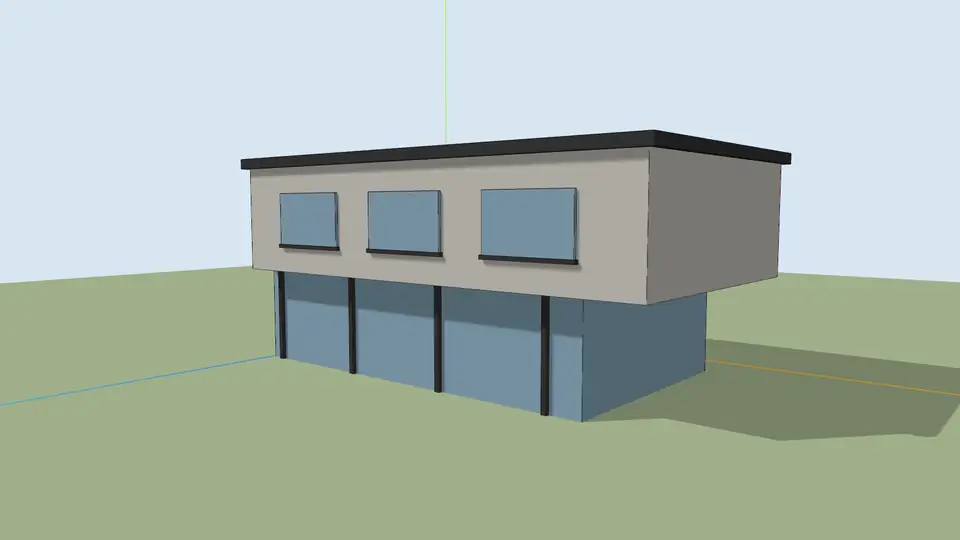
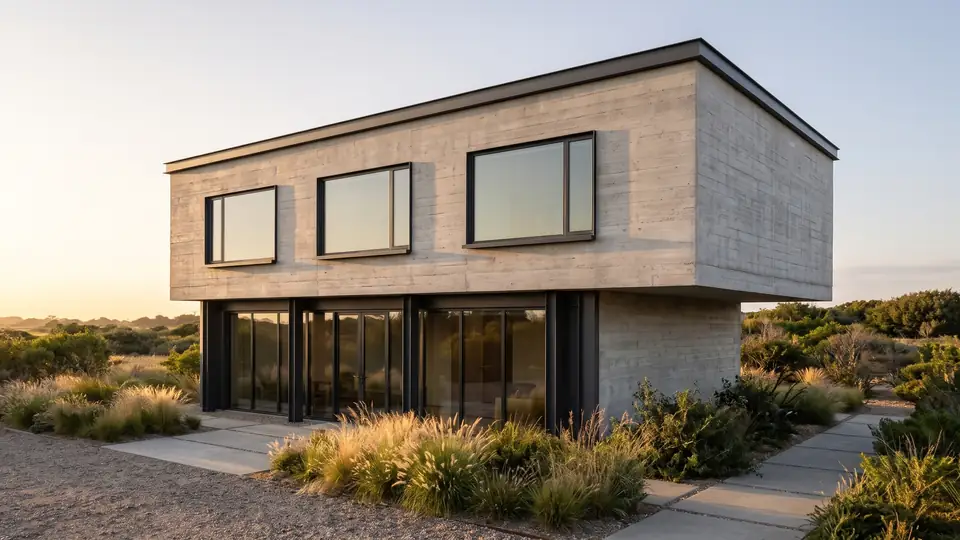
Test model, Nano Banana 2.1 at 2K, not retouched. How we tested
Three steps, nothing to set up
- 01
Screenshot your view
In SketchUp use File → Export → 2D Graphic, or just take a screenshot. Shadows on, axes and edges off.
- 02
Pick a style and a time of day
Six style presets, checked in our recipe test. Add a one-line materials note if you want.
- 03
Choose from four options
Download the one you like, or tap Brighter, Night or Add people & planting to get four more based on it.
How to compare four cladding options on one house
Change facade material swaps the cladding on a finished image and keeps the building. Each run makes 4 new options and checks them against your original upload. Here is a workflow for a cladding meeting.
- Render the house once in Modern minimal, a neutral starting point.
- Pick the option with the best light and camera. This is your base.
- On the base, choose Change facade material → vertical cedar boards.
- Go back to the same base and repeat with smooth white render.
- Repeat with board-formed concrete, then red clay brick.
- Keep the best option of each and download all four for the meeting.
How to frame an exterior view in your model
Stand the camera at about 1.6 to 1.7 m, the height of a person on the street, unless you want an aerial. A corner view that shows two facades reads better than a flat front view, and it gives the light something to rake across.
Keep vertical lines vertical. In SketchUp, Camera → Two-Point Perspective does this. Leave ground and sky in the frame, since the preset fills them. If the neighbors matter, model them as plain blocks; an empty plot reads as an empty plot. The shape of your crop sets the output shape, from 21:9 to 9:16.
What should you check on each facade material?
At 2K this sequence costs 40 credits: 8 for the base round and 8 for each material. That is half of the $9.99 Starter pack. Dark standing-seam metal and pale limestone panels are on the same menu.
| Material | What to look at |
|---|---|
| Vertical cedar boards | Board direction, and how boards meet window heads |
| Smooth white render | Shadow lines at reveals and the roof edge |
| Board-formed concrete | Board width and the lines between pours |
| Red clay brick | Coursing at openings, corners and the eaves |
Does the exterior preset add a site around the house?
What can shift in an AI exterior render?
The building's form comes from your view: massing, roofline, floor count, door and window openings, and structural rhythm. The finer layer is less certain.
- Mullions, railings, gutters and downpipes can move or simplify.
- House numbers and signage text are unreliable.
- Sides of the building your view does not show are not part of the result.
- Use the images for design talks, not for construction documents.
ArchFor at a glance
- What it is
- ArchFor is a web app that turns 3D model screenshots, sketches and existing renders into photorealistic architectural images. Credit packs from $9.99; no plugin and no subscription required.
- Inputs
- One JPG, PNG or WebP up to 10 MB: a model screenshot, clay model, hand sketch or elevation from any software
- Output
- Four images per click at the size you choose (1K, 2K or 4K; 2K by default), in the shape of your upload
- Time
- Usually under a minute at 2K; 4K takes a minute or more
- Price
- 1 credit per image at 1K, 2 at 2K, 3 at 4K. Packs from $9.99 for 80 credits (40 images at 2K); monthly plans from $19.99; no free tier
- Model
- Nano Banana 2.1, a Google Gemini image model (ArchFor isn't affiliated with Google)
- Privacy
- Uploads and results are private and deleted after 14 days
Pay for what you render
No subscription needed. Failed renders are refunded automatically.
Questions
Can I test cladding options?
Yes. Use Change facade material on a result to try vertical cedar boards, smooth white render, board-formed concrete, red clay brick, dark standing-seam metal or pale limestone panels on the same house.
Does it add landscaping?
Yes, a basic site of paving and planting that suits the style. Add people & planting adds more on a result. For a garden design, set Space to Landscape.
Does it handle aerial views?
Yes, for perspective aerials such as a bird's-eye view of the house and lot. Top-down site plans are not supported.
Can I mix two materials on one facade?
Partly. Write it in the note, for example "brick ground floor, cedar above". The model follows it as best effort, so check where the change falls.
Can I render the back of the house from the same upload?
No. The result shows what your view shows. Export a second view from the model and run it as its own job.
Can I get a dusk version?
Yes. Pick Golden hour or Night before you render, or use the Night button on any result. Night gives blue hour shortly after sunset, with warm light in the windows.