
D5 Render enhancer
Make D5 renders more realistic
To make a D5 render more realistic, upload the finished image and run Make it photoreal at Subtle. D5 already handles light well, so the enhancer adds texture detail, softer reflections and less uniform planting without touching your materials.
- Opens on Subtle: light, texture and reflections only
- Materials keep their color and type
- Four versions per run, usually under a minute at 2K
Updated November 3, 2026
Before and after
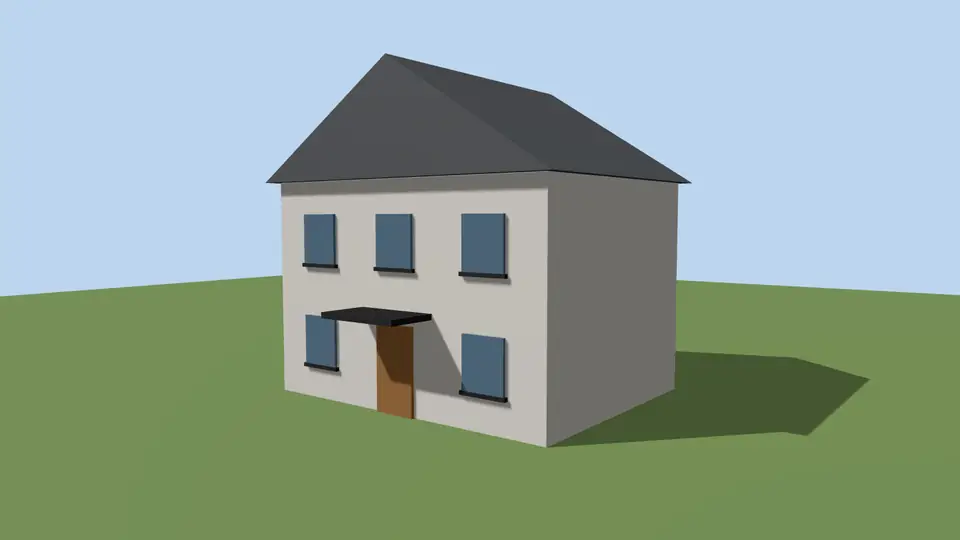
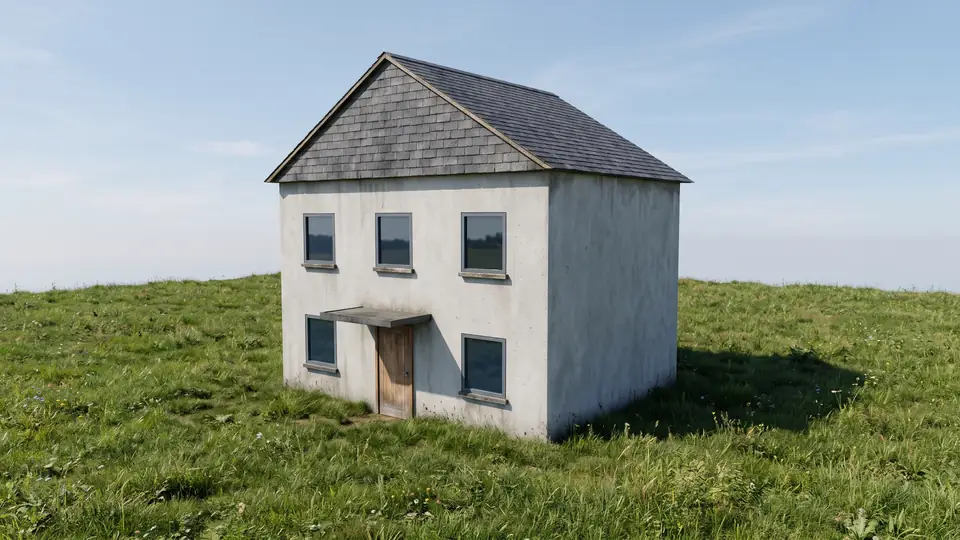
Test model, Nano Banana 2.1 at 2K, not retouched. How we tested
Three steps, nothing to set up
- 01
Export your render
Save a still from Enscape, Lumion, Twinmotion, D5 or any renderer as JPG or PNG.
- 02
Pick one change
Photoreal, golden hour, night, people, planting, sky or winter, and how far it may go.
- 03
Choose from four options
Download one, or apply the next change to it, for example Photoreal and then Night.
How to export a D5 still for ArchFor
Render the image from D5's image render panel, where you set resolution and aspect ratio. Exact labels vary between D5 versions. D5 also renders panoramas and video; ArchFor takes neither, so export a still image.
- Finish lighting and weather in D5 first. ArchFor works best as the last pass.
- Set the resolution to about 2K or 2.5K on the long side. Larger files add upload size, not detail.
- Render and save as JPG or PNG under 10 MB.
- Upload here and keep Make it photoreal on Subtle. Move to Balanced if the planting still looks repeated.
How do ArchFor and D5's own AI tools divide the work?
D5 Render has several AI tools of its own. Its documentation lists an AI Enhancer that improves lighting, materials, characters, fog and vegetation in your renders, AI Atmosphere Match, which copies the weather, sky and post look of a reference image onto your scene, and AI Style Transfer. They work inside your D5 project and know its geometry and materials.
ArchFor works on the exported picture, outside D5. It is useful when you want four alternatives of one change, when a colleague without D5 needs to adjust an image, or when you want Winter, Night or people added to a finished still.
| Task | Better in D5 | Better in ArchFor |
|---|---|---|
| Match the mood of a reference photo | AI Atmosphere Match | Not offered: no reference images |
| Fix one region of a render | D5 AI Enhancer with area selection | Not offered: whole frame only |
| Four takes on night, winter or new sky | Scene changes in D5 | One action, four options |
| Edit without D5 or a GPU | Not possible | Any browser |
Why Subtle is the starting point for D5
D5 exports usually have good global illumination already. Pushing them to Strong can repaint finishes you chose with care. Subtle forbids any change of color or material type and only refines light, texture detail and reflections. Use Balanced or Strong when the render is an early draft.
A quick test is the glazing. If D5 already shows convincing reflections with some interior visible, stay on Subtle. If the windows read as flat mirrors, Balanced will help more.
ArchFor is a web app that turns 3D model screenshots, sketches and existing renders into photorealistic architectural images. Credit packs from $9.99; no plugin and no subscription required.
ArchFor at a glance
- What it is
- ArchFor is a web app that turns 3D model screenshots, sketches and existing renders into photorealistic architectural images. Credit packs from $9.99; no plugin and no subscription required.
- Inputs
- One JPG, PNG or WebP up to 10 MB, exported from any renderer
- Output
- Four images per click at the size you choose (1K, 2K or 4K; 2K by default), in the shape of your upload
- Time
- Usually under a minute at 2K; 4K takes a minute or more
- Price
- 1 credit per image at 1K, 2 at 2K, 3 at 4K. Packs from $9.99 for 80 credits (40 images at 2K); monthly plans from $19.99; no free tier
- Model
- Nano Banana 2.1, a Google Gemini image model (ArchFor isn't affiliated with Google)
- Privacy
- Uploads and results are private and deleted after 14 days
Pay for what you render
No subscription needed. Failed renders are refunded automatically.
Questions
How does it compare with D5's AI Enhancer?
They suit different moments. D5's AI Enhancer runs inside D5 and can target selected areas such as sky or vegetation. ArchFor works on the whole exported image, gives four options per run and adds actions such as Night, Winter and Add people.
Does it work with D5 Lite?
Yes, if you save a still. D5 Lite is D5's free plugin that renders inside SketchUp and, more recently, Rhino and Revit; D5 says its AI features need a D5 Pro license. ArchFor reads only the exported image, so D5 Lite's free plan is enough.
Can I enhance D5 night scenes?
Yes. Use Make it photoreal on Subtle to keep your lighting as designed. To turn a D5 day scene into night instead, run the Night action on it.
Will my material choices change?
Not on Subtle. Color and material type stay fixed. Balanced refines finishes, and Strong may reinterpret them, but neither changes form or openings.
Is ArchFor connected to D5?
No. D5 Render and D5 Lite are trademarks of their owner, and ArchFor is not affiliated with them. You upload an image; nothing links to your D5 scene.
Can someone without a D5 workstation edit the image?
Yes. D5 lists Windows 10 and an NVIDIA RTX GPU for D5 Lite. ArchFor needs only a browser, so a colleague on a Mac, iPad or phone can run Night or Add people on your export.