
Interior render enhancer
Make interior renders look like photographs
Upload an interior render and the photoreal action adds soft daylight, real fabric and timber grain, and the small shadows that real rooms have. Furniture positions, walls and windows stay where you put them.
- One upload, four enhanced versions at 1K, 2K or 4K
- Furniture, walls and the camera stay in place
- From $9.99 for 80 credits; 8 credits per round at 2K
Updated November 3, 2026
Before and after
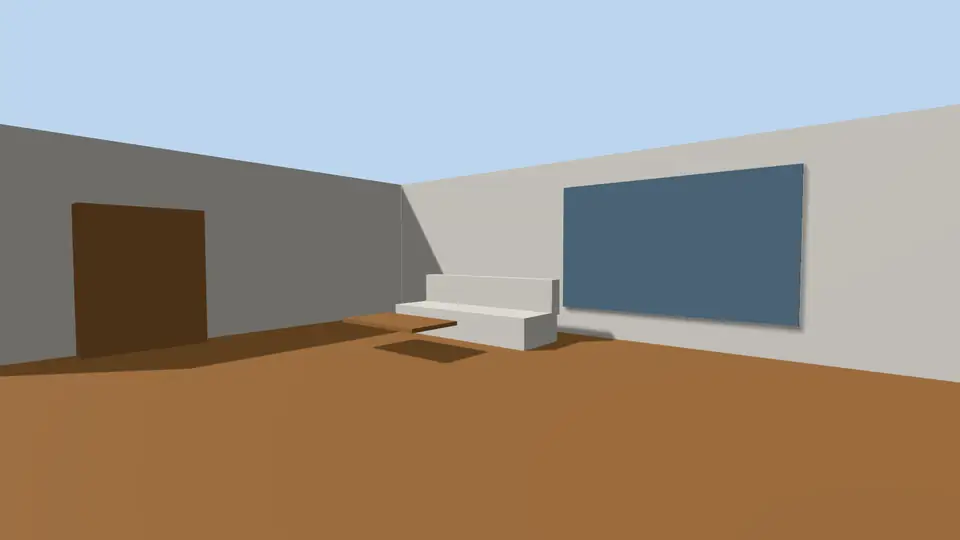
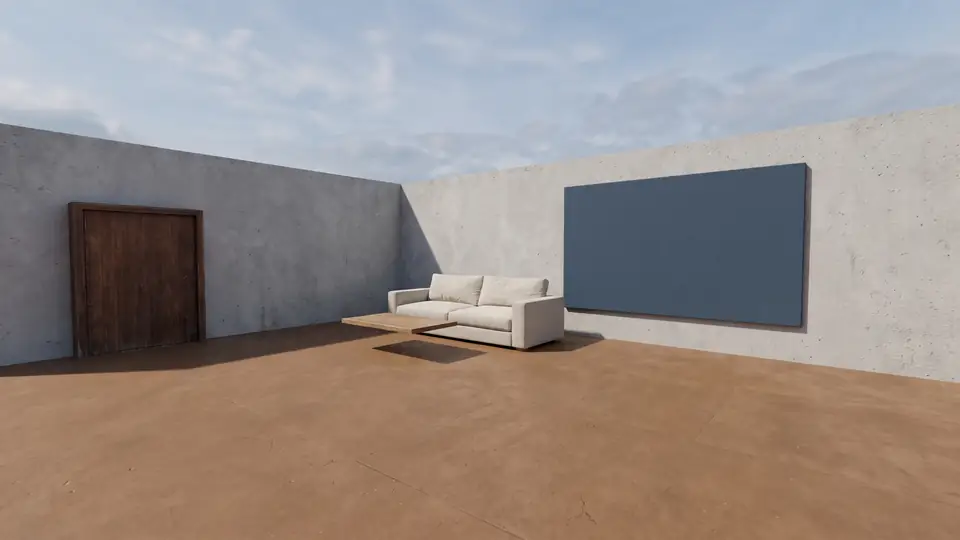
Test model, Nano Banana 2.1 at 2K, not retouched. How we tested
Three steps, nothing to set up
- 01
Export your render
Save a still from Enscape, Lumion, Twinmotion, D5 or any renderer as JPG or PNG.
- 02
Pick one change
Photoreal, golden hour, night, people, planting, sky or winter, and how far it may go.
- 03
Choose from four options
Download one, or apply the next change to it, for example Photoreal and then Night.
Why do real-time interior renders look fake?
Most interior renders fail on the same five points. Real-time engines approximate bounced light, and asset libraries reuse the same textures. The photoreal action is written to remove exactly these signs.
| Fault | What you see | What the photoreal action does |
|---|---|---|
| Plastic fabric | Sofas and curtains with an even sheen and no weave | Adds weave, creases and matte areas while keeping the color |
| Flat ambient light | Every corner equally bright, no falloff from the windows | Lets daylight fall off across the room so far walls sit darker |
| Missing contact shadows | Chairs and tables that seem to float | Adds soft shadows where legs and bases meet the floor |
| Repeating floor texture | The same plank knot every 1.2 m | Breaks the pattern with varied grain and wear |
| Glowing white walls | Walls brighter than the window | Brings white surfaces back below the daylight level, with gentle gradients |
Does it keep my furniture layout?
Yes, as far as an AI image can. The recipe locks the camera, the lens, the openings and the position of each object. On Balanced the sofa stays a grey linen sofa; only its finish becomes more believable.
Small objects are the weak point. Books, vases and cables can change shape or disappear. Keep a shelf of styling items out of the shot if it must stay exact.
Which strength should I use for an interior?
Use Subtle when the client has signed off on finishes: only light, texture detail and reflections change. Balanced is the default and suits most design-stage views. Strong may reinterpret finishes and indoor plants, so a matte tile can come back polished. Pick it only for mood images.
- Subtle: final finishes, presentation boards
- Balanced: design reviews, most living rooms and kitchens
- Strong: early mood shots where only the layout matters
How to prepare an interior render for upload
A clean export gives the enhancer less to guess. You do not need a high-end GPU or long render times; a quick real-time still is enough.
ArchFor is a web app that turns 3D model screenshots, sketches and existing renders into photorealistic architectural images. Credit packs from $9.99; no plugin and no subscription required.
- Use a lens around 24 mm. Very wide lenses bend furniture at the edges, and the AI tends to keep the distortion.
- Leave exposure slightly low. It is easier to add light than to recover blown-out walls.
- Export at least 1600 px on the long side, as JPG, PNG or WebP under 10 MB.
- Upload, keep Make it photoreal and Balanced, and add a note such as "walnut veneer, boucle armchair" if a finish matters.
ArchFor at a glance
- What it is
- ArchFor is a web app that turns 3D model screenshots, sketches and existing renders into photorealistic architectural images. Credit packs from $9.99; no plugin and no subscription required.
- Inputs
- One JPG, PNG or WebP up to 10 MB, exported from any renderer
- Output
- Four images per click at the size you choose (1K, 2K or 4K; 2K by default), in the shape of your upload
- Time
- Usually under a minute at 2K; 4K takes a minute or more
- Price
- 1 credit per image at 1K, 2 at 2K, 3 at 4K. Packs from $9.99 for 80 credits (40 images at 2K); monthly plans from $19.99; no free tier
- Model
- Nano Banana 2.1, a Google Gemini image model (ArchFor isn't affiliated with Google)
- Privacy
- Uploads and results are private and deleted after 14 days
Pay for what you render
No subscription needed. Failed renders are refunded automatically.
Questions
Does it keep the furniture layout?
Yes. Furniture, walls, doors and windows keep their positions, because the upload is treated as the reference for the whole composition. Small decor such as books or vases can change, so check those before presenting.
Will fabrics look real?
Usually they look much closer to real cloth. Linen, wool and velvet gain weave and creases, and leather loses its plastic sheen. Name the fabric in the note, for example "rust velvet sofa", so the result does not drift to a different material.
Can I make a night interior?
Partly. The Night action moves the scene to blue hour and turns on warm lights behind the glazing, which works best on views that include windows. It does not place new lamps where you choose. Run it on your best photoreal result.
Does the view through the window change?
It can. A plain grey or white backdrop is often replaced by a soft, believable exterior. If the view must stay blank, use Subtle, which limits changes to light, texture and reflections.
Is my render kept private?
Yes. Uploads and results are visible only to you and are deleted after 14 days. Only the image leaves your computer, never your model file.