
Chief Architect and Home Designer
Photoreal renders from Chief Architect views
Export a Chief Architect camera view with Export Picture, upload it, and ArchFor gives you four photoreal renders of that view. It suits residential client presentations where you need a believable house fast.
- Export with File > Export > Export Picture as PNG or JPG
- Opens set to Exterior and Model screenshot
- Four options per click at 1K, 2K or 4K
Updated November 3, 2026
Before and after
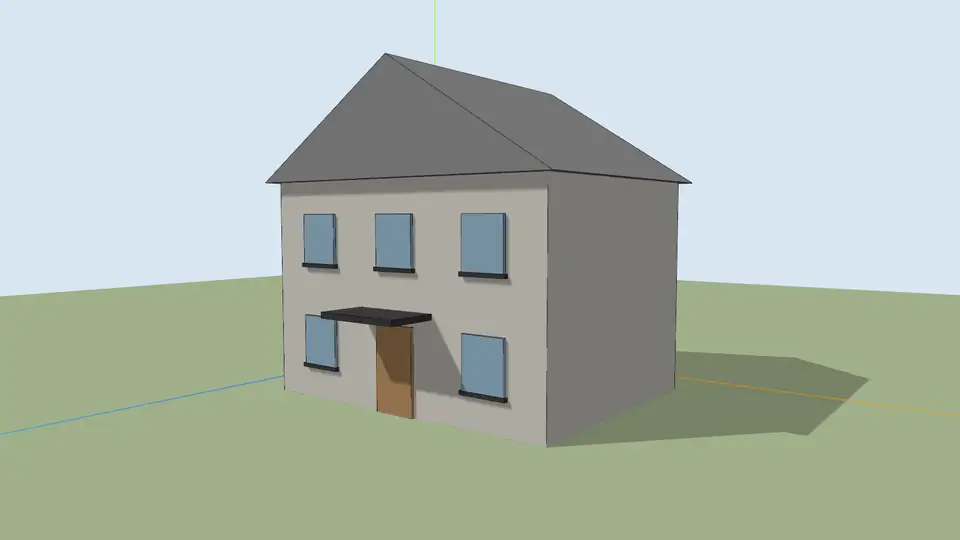
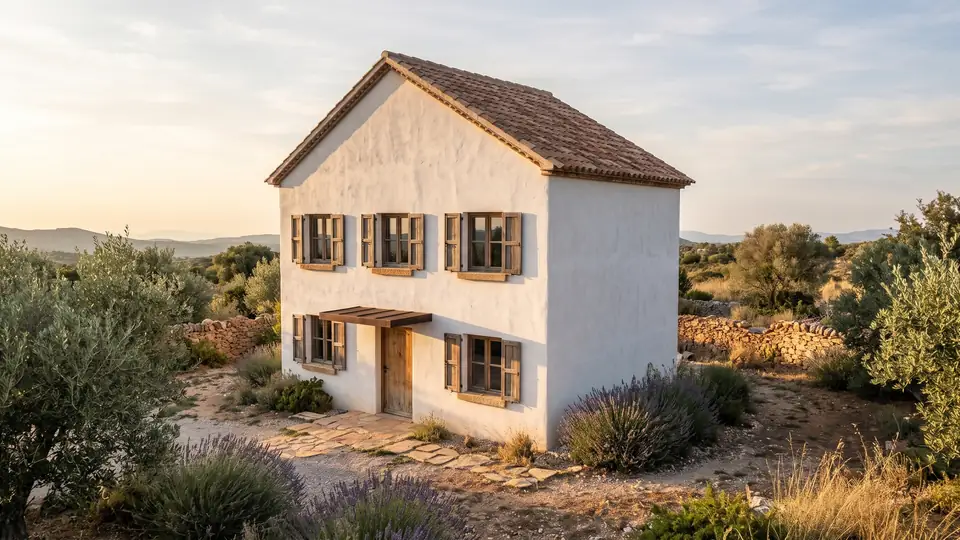
Test model, Nano Banana 2.1 at 2K, not retouched. How we tested
Three steps, nothing to set up
- 01
Screenshot your view
In SketchUp use File → Export → 2D Graphic, or just take a screenshot. Shadows on, axes and edges off.
- 02
Pick a style and a time of day
Six style presets, checked in our recipe test. Add a one-line materials note if you want.
- 03
Choose from four options
Download the one you like, or tap Brighter, Night or Add people & planting to get four more based on it.
How to export a Chief Architect camera view as a picture
Export Picture saves the active plan or 3D view to an image file. You set the pixel size in the dialog, which beats a screen grab for sharpness.
- Create the view with a camera tool from the 3D menu and frame the house.
- With the camera view active, choose File > Export > Export Picture.
- Set Width and Height, at least 2,000 pixels on the long side.
- Click OK, choose PNG as the file type, and save.
- Upload it to ArchFor. Model screenshot and Exterior are already set.
Which rendering technique should the camera view use?
Standard gives the most reliable input. It shows your materials as color without heavy effects, so the AI can read siding, roofing and trim as hints. Clay works too; upload it with the Clay / white model input.
Vector View and Technical Illustration produce line-heavy images. Those work best with the Hand sketch input. Watercolor and Glass House are stylized, and Glass House shows see-through surfaces, so walls can come out thin or glassy. If you export a Physically Based view, it is already a render: use the Render Enhancer on it instead.
| Technique | ArchFor input |
|---|---|
| Standard | Model screenshot |
| Clay | Clay / white model |
| Vector View, Technical Illustration | Hand sketch |
| Physically Based | Render Enhancer |
| Glass House, Watercolor | Not recommended |
Using the renders in residential client presentations
Homeowners respond to light, planting and material, not linework. Run the front elevation camera at Golden hour, then use Change facade material to show the same house in red clay brick and in smooth white render. Two or three rounds give a material board in under ten minutes.
Add people & planting puts life in the yard; Night shows the same house after dark. For print boards, render at 4K; it takes longer and makes large files. Tell clients the images are illustrative: small trim, railings or gutter lines can shift, and they are not construction documents.
Keep one camera per elevation and reuse it after design changes. Because ArchFor holds camera and horizon from the upload, a new export from the same camera gives renders that line up with the earlier set, which makes before-and-after slides easy to read.
What it costs for a typical house
A front view, a rear view and one interior at two rounds each is 6 rounds at 2K, or 48 credits. The $24.99 Project pack holds 220 credits. Chief Architect and Home Designer are trademarks of their owner; ArchFor is not affiliated with it.
ArchFor is a web app that turns 3D model screenshots, sketches and existing renders into photorealistic architectural images. Credit packs from $9.99; no plugin and no subscription required.
ArchFor at a glance
- What it is
- ArchFor is a web app that turns 3D model screenshots, sketches and existing renders into photorealistic architectural images. Credit packs from $9.99; no plugin and no subscription required.
- Inputs
- One JPG, PNG or WebP up to 10 MB: a model screenshot, clay model, hand sketch or elevation from any software
- Output
- Four images per click at the size you choose (1K, 2K or 4K; 2K by default), in the shape of your upload
- Time
- Usually under a minute at 2K; 4K takes a minute or more
- Price
- 1 credit per image at 1K, 2 at 2K, 3 at 4K. Packs from $9.99 for 80 credits (40 images at 2K); monthly plans from $19.99; no free tier
- Model
- Nano Banana 2.1, a Google Gemini image model (ArchFor isn't affiliated with Google)
- Privacy
- Uploads and results are private and deleted after 14 days
Pay for what you render
No subscription needed. Failed renders are refunded automatically.
Questions
Which camera mode should I use?
A full camera view with the Standard rendering technique. It carries your materials as color without stylized effects. Line-only techniques work better uploaded as Hand sketch.
Does it work for interiors?
Yes. Export an interior camera view and switch Space to Interior. Cabinets and furniture you placed stay in position; decor you did not place may be added.
Does it work with Home Designer?
Yes. Home Designer Suite, Architectural and Pro use the same Export Picture command. Chief Architect Premier works the same way.
Will it change the roof or add a garage?
No. Roofline, floor count and openings come from your view, and the recipe holds them. Check each option, since this is best effort, not CAD.
Can I show a client several siding options?
Yes. Pick one result and run Change facade material for each option, such as vertical cedar boards or dark standing-seam metal. Each run costs one round and keeps the house as exported.