
Render Enhancer · Enscape · Lumion · Twinmotion · D5
Make your render look photoreal — without re-rendering
Upload one exported render, pick one action and a strength, and ArchFor returns four enhanced versions at the size you pick: 1K, 2K or 4K. The camera, massing and openings stay as you rendered them; light, materials, planting or sky change.
- 7 actions, one per run, at Subtle, Balanced or Strong
- 4 options per run at 1K, 2K or 4K, usually in under a minute at 2K
- A round of 4 costs 4, 8 or 12 credits by size
Updated November 3, 2026
Before and after
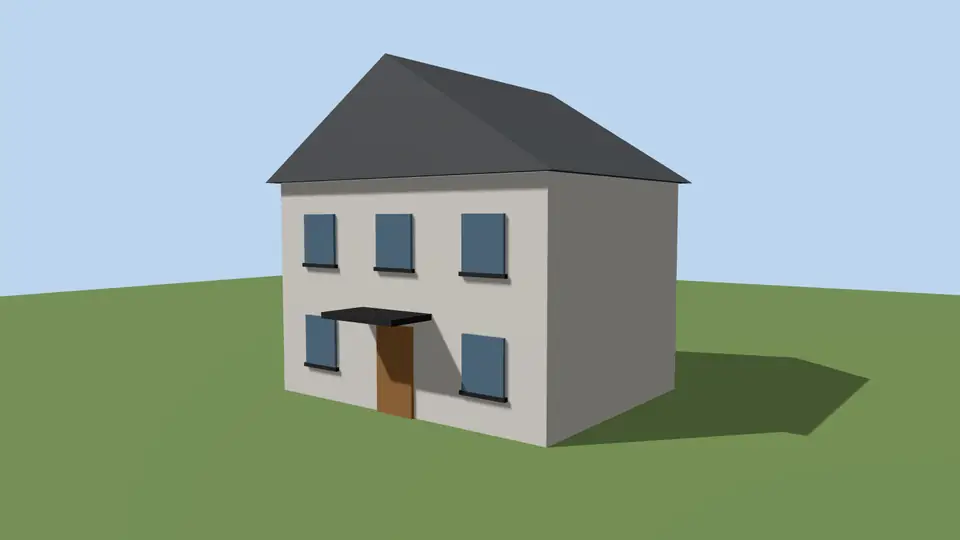
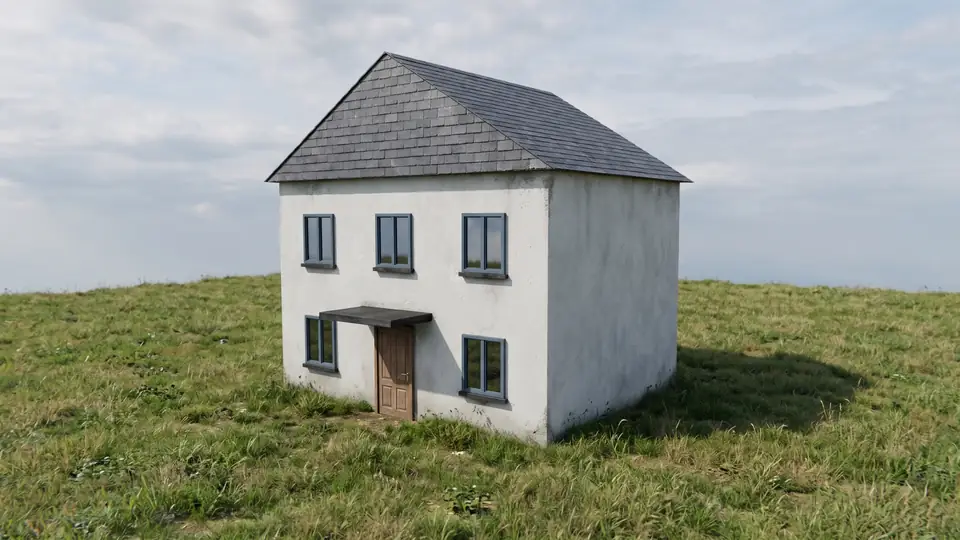
Test model, Nano Banana 2.1 at 2K, not retouched. How we tested
Three steps, nothing to set up
- 01
Export your render
Save a still from Enscape, Lumion, Twinmotion, D5 or any renderer as JPG or PNG.
- 02
Pick one change
Photoreal, golden hour, night, people, planting, sky or winter, and how far it may go.
- 03
Choose from four options
Download one, or apply the next change to it, for example Photoreal and then Night.
What does each Render Enhancer action change?
Each run applies exactly one action to the image you upload. The table lists what the action is allowed to touch and what it must leave alone.
| Action | What it changes | What it keeps |
|---|---|---|
| Make it photoreal | Glass reflections, grain and wear in timber, stone and concrete, contact shadows, irregular vegetation, a real sky | Building form, openings, camera, material types |
| Golden hour | Time of day only: low warm sun, long soft shadows, warmer reflections | Everything else, identical |
| Night | Blue hour after sunset, warm interior lights behind the glass, a few discreet exterior lights, deep-blue sky | Geometry, materials, composition |
| Add people | Three to six people at the scale of the camera height, on paths and terraces | Entrances stay clear; the building is untouched |
| Add planting | Grasses and shrubs at the edges, two to four trees where the ground is open | Windows, doors and the main facade stay uncovered |
| Replace sky | The sky only, matched to the existing light direction and time of day, with glass reflections updated | Ground, building, light direction |
| Winter | A thin layer of snow on the ground and flat surfaces, bare deciduous trees, overcast light, warm light from inside | Building form and openings |
How much can Subtle, Balanced and Strong change?
Strength sets how far the model may move away from your pixels. None of the three levels may change form or openings. Start with Balanced; drop to Subtle if your material choices are final, and go to Strong when the planting or finishes look obviously computer-made.
| Strength | Allowed | Not allowed |
|---|---|---|
| Subtle | Light, texture detail and reflections | Any change of color or material type |
| Balanced | Finishes refined for realism | A material that reads as a different material |
| Strong | Finishes and planting reinterpreted | Building form or openings |
How to enhance an exported render
Any renderer works, because ArchFor only sees the image. Export a still, not a panorama or a video frame sequence.
- Export the view as JPG, PNG or WebP, under 10 MB.
- Upload it to the form on this page.
- Choose one action and a strength. Add a note of up to 200 characters if a material needs naming, for example "oak floor, matte black window frames".
- Click Enhance. Four versions arrive, usually in under a minute at 2K.
- On the best one, run an adjustment (More like this, Brighter, Moodier, Night, Add people & planting, Change facade material), or download it and upload it again for another action.
How to make five presentation boards from one render
A client presentation usually needs the same view in several moods. Upload one render, make the photoreal version first, then download it and run each of the other actions on it as a new upload, so every board shares the same materials and camera.
- Five boards take five runs: one on your upload and four on the downloaded hero image.
- Each run gives four options, so you choose the best of twenty images in total.
- For print boards, run the whole sequence at 4K; 2K is enough for a screen.
| Board | Action and strength | What it shows the client |
|---|---|---|
| 1. Hero image | Make it photoreal · Balanced | The design as built, in daylight |
| 2. Arrival | Golden hour · Balanced | Warm low sun on the facade, for the cover or the first slide |
| 3. Evening | Night · Balanced | Lit interiors behind the glass, how the building reads after dark |
| 4. In use | Add people · Balanced | Scale, entrances and how the outdoor space is used |
| 5. Season | Winter or Replace sky · Subtle | The same view in another season or weather |
What are the limits of an AI render enhancer?
The results are AI images. They are fine for client reviews, competitions and social posts, not for construction documents. ArchFor uses Google's Gemini image model Nano Banana 2.1 with prompts built from tested recipes; ArchFor is not affiliated with Google.
ArchFor is a web app that turns 3D model screenshots, sketches and existing renders into photorealistic architectural images. Credit packs from $9.99; no plugin and no subscription required.
- Thin elements such as mullions, railings and signage can shift by a few pixels or merge.
- Text in the image, such as a shop sign, is unreliable.
- Panoramas, 360° views, video and batch uploads are not supported.
- You cannot write your own prompt; the note covers materials and details only.
ArchFor at a glance
- What it is
- ArchFor is a web app that turns 3D model screenshots, sketches and existing renders into photorealistic architectural images. Credit packs from $9.99; no plugin and no subscription required.
- Inputs
- One JPG, PNG or WebP up to 10 MB, exported from any renderer
- Output
- Four images per click at the size you choose (1K, 2K or 4K; 2K by default), in the shape of your upload
- Time
- Usually under a minute at 2K; 4K takes a minute or more
- Price
- 1 credit per image at 1K, 2 at 2K, 3 at 4K. Packs from $9.99 for 80 credits (40 images at 2K); monthly plans from $19.99; no free tier
- Model
- Nano Banana 2.1, a Google Gemini image model (ArchFor isn't affiliated with Google)
- Privacy
- Uploads and results are private and deleted after 14 days
Pay for what you render
No subscription needed. Failed renders are refunded automatically.
Questions
Will it move walls or windows?
It should not. Every recipe treats your upload as the authority for massing, roofline, floor count, door and window openings, camera and horizon. This is best effort, so check thin details such as mullions before you send an image to a client.
What resolution do I get?
You choose: 1K, 2K (default) or 4K, at 1, 2 or 3 credits per image. Images come in the aspect ratio nearest to your upload, from 21:9 to 9:16. 4K is generated at 4K, not upscaled, so it takes longer and the files are large.
Can I combine actions?
Not in one run. Each run applies one action, so you chain them: Make it photoreal first, then Night or Add people & planting on the version you like, or download it and upload it again for another action. Each step makes four new options and is checked against your original upload.
Which renderers does it work with?
Any renderer that saves a still image. Exports from Enscape, Lumion, Twinmotion, D5 Render, V-Ray or a screenshot of a viewport all work. These names are trademarks of their owners, and ArchFor is not affiliated with them.
What does an enhancement cost?
A round of four costs 4 credits at 1K, 8 at 2K or 12 at 4K. The Starter pack is $9.99 for 80 credits, which is ten rounds at 2K. Failed images are refunded automatically, and there is no free trial.