
Twinmotion render enhancer
Make Twinmotion renders photoreal
Upload a Twinmotion image export, keep Make it photoreal on Balanced, and get four photoreal versions at 1K, 2K or 4K. It needs no path tracer and no RTX card, and it runs in the browser on a Mac or a Windows laptop.
- Works on standard real-time exports from Twinmotion
- No GPU needed on your side; it runs in the browser
- Subtle, Balanced or Strong sets how much may change
Updated November 3, 2026
Before and after
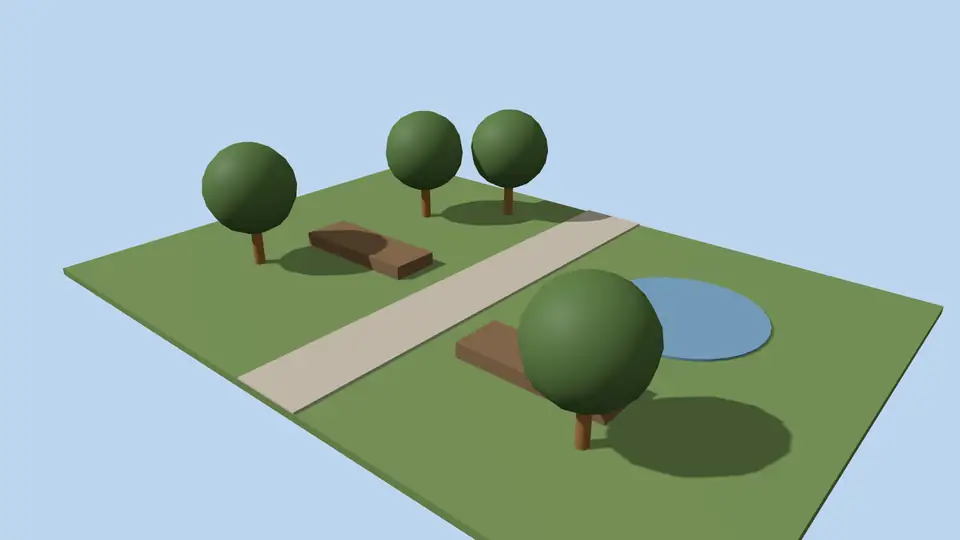
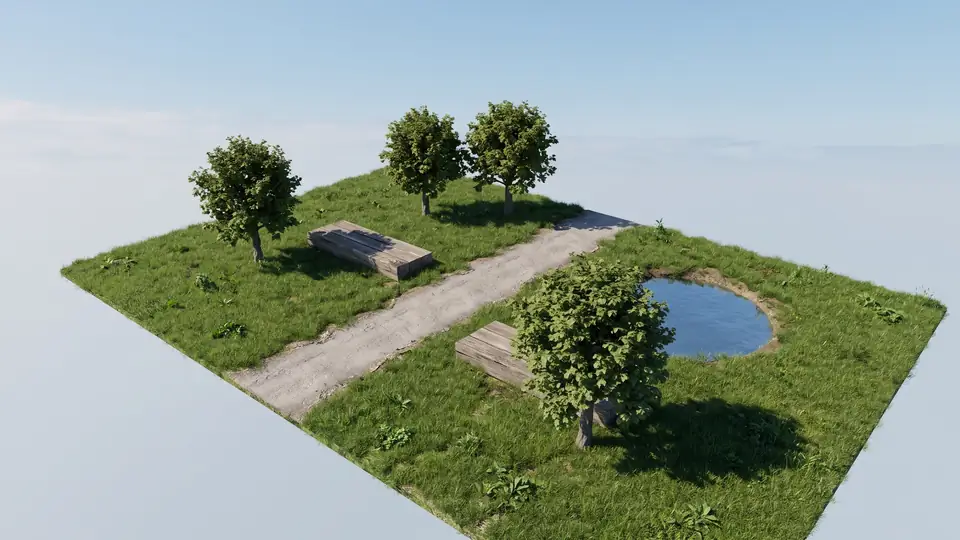
Test model, Nano Banana 2.1 at 2K, not retouched. How we tested
Three steps, nothing to set up
- 01
Export your render
Save a still from Enscape, Lumion, Twinmotion, D5 or any renderer as JPG or PNG.
- 02
Pick one change
Photoreal, golden hour, night, people, planting, sky or winter, and how far it may go.
- 03
Choose from four options
Download one, or apply the next change to it, for example Photoreal and then Night.
What goes wrong in Twinmotion real-time exports?
Real-time mode trades accuracy for speed. The faults below are the usual ones, and they are what the photoreal action targets.
- Glass that shows a smeared screen-space reflection or none at all.
- Shadows that are too sharp outdoors and missing in corners indoors.
- Library vegetation that sways well in video but looks flat in a still.
- Grass and ground cover with a uniform tint.
- A sky that is too saturated for the light on the facade.
How can I tell which faults my Twinmotion still has?
Compare the shadow under a bench or a parked car with the shadow of the building. If one is crisp and the other blurred, the photoreal action will even them out. Then zoom into the glazing: a blank or smeared pane is the other usual tell. Both are fixed on Balanced; move to Strong only when library trees still dominate the frame.
When is Twinmotion's path tracer worth using instead?
Twinmotion has its own path tracer, which computes light physically. According to Epic's documentation, it runs on Windows with DirectX 12 and a GPU that supports DXR ray tracing; it is not available on macOS. Use it when light must be physically accurate, for example for a daylight study, and you have the hardware.
Use ArchFor when you need a convincing image quickly, you are on a Mac, or the main problem is planting and materials rather than light. You can also do both: path trace, then run Subtle to clean grain and add texture detail.
| Need | Path tracer | ArchFor |
|---|---|---|
| Physically correct light | Yes | No, it is an AI image |
| Works on a Mac | No | Yes |
| Hardware | DXR-capable GPU | Any device with a browser |
| New planting or sky in one step | Scene changes in Twinmotion | One action, four options |
How to export a Twinmotion image for upload
The steps follow Epic's Twinmotion documentation at the time of writing (November 2026).
- Create the image in the Media dock, then click it to open the Image tab in the Ambience panel and set the output size.
- Open the Export panel and click the plus button next to Image.
- Choose PNG or JPG. EXR is also offered by Twinmotion but cannot be uploaded to ArchFor.
- Export, keep the file under 10 MB, and upload it here.
What stays fixed after enhancement?
Your upload sets massing, roofline, openings, structural rhythm, camera and horizon. On Balanced, finishes are refined but keep their identity. Small details such as railings or signage can move, and text is unreliable.
ArchFor is a web app that turns 3D model screenshots, sketches and existing renders into photorealistic architectural images. Credit packs from $9.99; no plugin and no subscription required.
ArchFor at a glance
- What it is
- ArchFor is a web app that turns 3D model screenshots, sketches and existing renders into photorealistic architectural images. Credit packs from $9.99; no plugin and no subscription required.
- Inputs
- One JPG, PNG or WebP up to 10 MB, exported from any renderer
- Output
- Four images per click at the size you choose (1K, 2K or 4K; 2K by default), in the shape of your upload
- Time
- Usually under a minute at 2K; 4K takes a minute or more
- Price
- 1 credit per image at 1K, 2 at 2K, 3 at 4K. Packs from $9.99 for 80 credits (40 images at 2K); monthly plans from $19.99; no free tier
- Model
- Nano Banana 2.1, a Google Gemini image model (ArchFor isn't affiliated with Google)
- Privacy
- Uploads and results are private and deleted after 14 days
Pay for what you render
No subscription needed. Failed renders are refunded automatically.
Questions
Do I need the path tracer first?
No. A standard real-time export is enough, and that is what the photoreal action is written for. A path-traced image also works; use Subtle on it so only light, texture and reflections change.
What resolution should I export?
Around 1920 to 2560 px on the long side is plenty. You choose the output size: 1K, 2K (default) or 4K, at 1, 2 or 3 credits per image, in the nearest aspect ratio to your file.
Will Twinmotion vegetation look natural?
Mostly yes. The photoreal action breaks up repeated trees and flat grass. On Strong it may reinterpret planting more freely, but it is told to keep the building form and openings.
Can I enhance a Twinmotion panorama or video?
No. Panoramas, 360° images and video are not supported. Export a still image from the Media dock as PNG or JPG and upload that instead.
Is ArchFor part of Twinmotion?
No. Twinmotion is a trademark of Epic Games, and ArchFor is not affiliated with it. ArchFor is a separate web app that works on any exported image.
Can I use it on a Mac?
Yes. ArchFor runs in the browser on Mac, Windows, iPad and phones. That covers the case where the Twinmotion path tracer is unavailable, since Epic does not offer it on macOS.