
Review images without a render engine
Render SketchUp without V-Ray
You can render SketchUp without V-Ray by uploading an image of the view to ArchFor. There are no materials to map, lights to place or settings to tune, and four options at 2K usually arrive in under a minute. ArchFor is a web app that turns 3D model screenshots, sketches and existing renders into photorealistic architectural images. Credit packs from $9.99; no plugin and no subscription required.
- Opens on the Warm timber style; five more to choose from
- A round of 4 costs 8 credits at 2K
- No license, install or graphics card needed
Updated November 3, 2026
Before and after
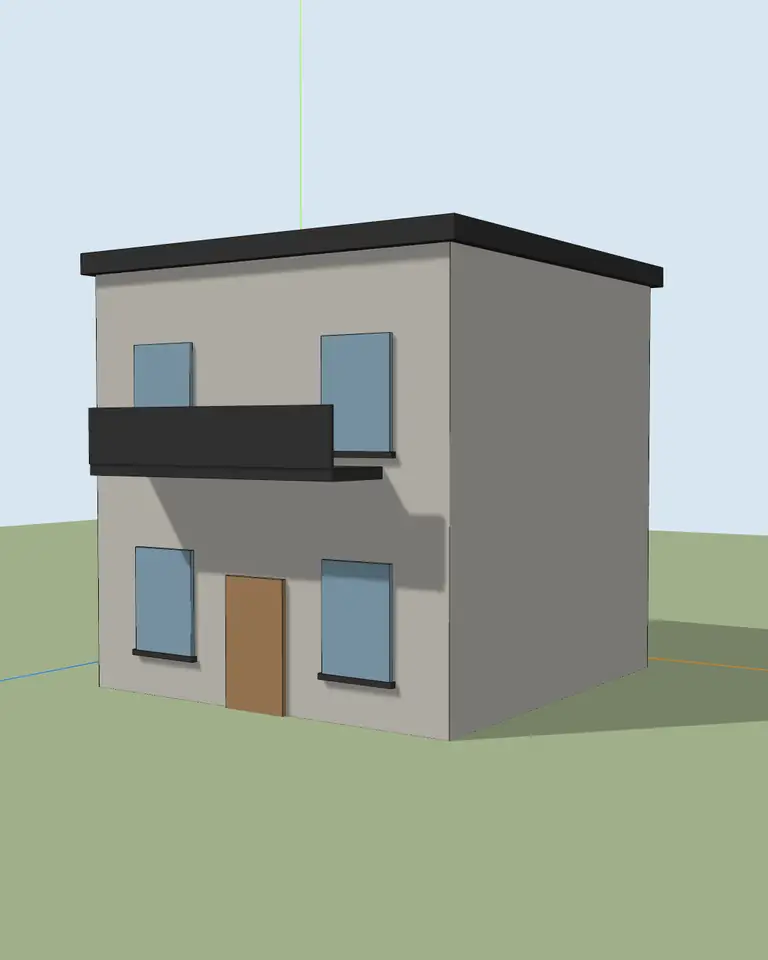
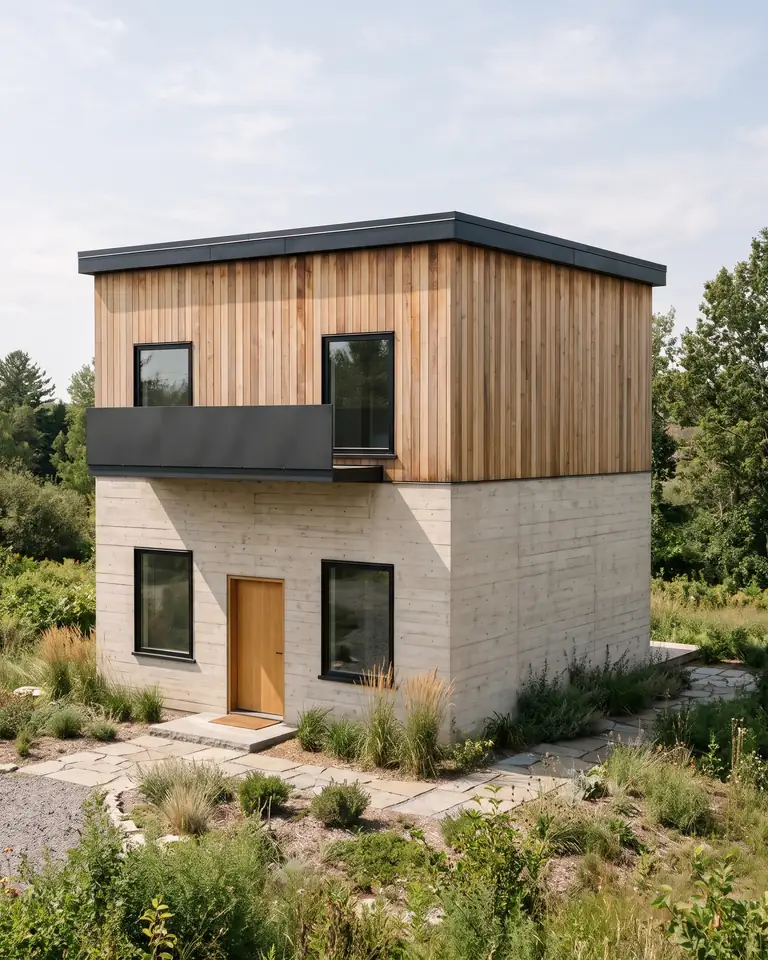
Test model, Nano Banana 2.1 at 2K, not retouched. How we tested
Three steps, nothing to set up
- 01
Screenshot your view
In SketchUp use File → Export → 2D Graphic, or just take a screenshot. Shadows on, axes and edges off.
- 02
Pick a style and a time of day
Six style presets, checked in our recipe test. Add a one-line materials note if you want.
- 03
Choose from four options
Download the one you like, or tap Brighter, Night or Add people & planting to get four more based on it.
How long does a V-Ray view take compared with a screenshot?
The table below breaks one exterior view into steps. The times are rough estimates for a model with plain SketchUp colors, not measured benchmarks. Your own times depend on the model, your hardware and how well you know V-Ray. Most of the saving sits in two rows: materials and test renders. Those are the steps that repeat each time a client changes the cladding.
| Step | V-Ray for SketchUp | Screenshot to ArchFor |
|---|---|---|
| Install and license | Once; varies | None |
| Assign and tune materials | 30 minutes to several hours | Pick a style |
| Sun, sky and lights | 15 to 60 minutes | Pick Day, Golden hour or Night |
| Test renders | Several passes of a few minutes each | None |
| Final render | Minutes to over an hour | Usually under a minute for 4 |
| Add people & planting | Import and place assets | One button on a result |
How to get a client review image without V-Ray
- Save the view as a scene in SketchUp.
- Choose File → Export → 2D Graphic and save a PNG or JPEG, about 3,000 pixels wide.
- Upload it to ArchFor with Input set to Model screenshot.
- Keep Warm timber or switch style, then choose a time of day.
- Render, then pick the option closest to your intent.
- Use Brighter, Moodier or Change facade material to adjust it.
- Download the image at the size you rendered it: 1K, 2K or 4K.
When should you still use V-Ray?
An image model draws a believable picture from your view. V-Ray calculates light from your actual scene. Keep V-Ray for work where that difference matters.
- Final marketing images where every finish must match the specification.
- Exact material control, such as a named product, tile size or wood species on a set surface.
- Animations and walkthroughs. ArchFor makes still images only.
- Matching multi-view sets. Each ArchFor job starts from one upload, so finishes can differ slightly between views.
- Panoramas and 360° views, which ArchFor does not make.
Can ArchFor and V-Ray share one project?
Yes, and it is a common split. Use ArchFor in the early weeks, when the client is still choosing between a timber and a brick facade. Four options per click give you something to point at in a meeting the same day.
Once the direction is fixed, build the V-Ray materials for that one choice and render the final set. You set up materials once, for a scheme that is already approved. Existing V-Ray images can also go through the Render Enhancer, for example to add people or switch to dusk.
What does a review round cost?
A 2K image costs 2 credits; 1K costs 1 and 4K costs 3. Three views with one follow-up each comes to 48 credits at 2K. The Starter pack is $9.99 for 80 credits, and the Project pack is $24.99 for 220. Failed images are refunded automatically.
ArchFor at a glance
- What it is
- ArchFor is a web app that turns 3D model screenshots, sketches and existing renders into photorealistic architectural images. Credit packs from $9.99; no plugin and no subscription required.
- Inputs
- One JPG, PNG or WebP up to 10 MB: a model screenshot, clay model, hand sketch or elevation from any software
- Output
- Four images per click at the size you choose (1K, 2K or 4K; 2K by default), in the shape of your upload
- Time
- Usually under a minute at 2K; 4K takes a minute or more
- Price
- 1 credit per image at 1K, 2 at 2K, 3 at 4K. Packs from $9.99 for 80 credits (40 images at 2K); monthly plans from $19.99; no free tier
- Model
- Nano Banana 2.1, a Google Gemini image model (ArchFor isn't affiliated with Google)
- Privacy
- Uploads and results are private and deleted after 14 days
Pay for what you render
No subscription needed. Failed renders are refunded automatically.
Questions
Is it as good as V-Ray?
It does a different job. V-Ray simulates the light in your scene with the materials you set. ArchFor generates a photoreal image from a picture of the view. That is often enough for early reviews, but not when finishes must be exact.
Can I use it for final renders?
For concept boards and client reviews, yes. For marketing images where details must be exact, check every result, because small parts such as mullions or railings can shift. The results are never for construction documents.
Does it read my SketchUp materials?
No. ArchFor sees the image only, not the model or its material list. The style preset and your one-line note set the materials, for example "black standing-seam roof, oak soffit".
Do I need a V-Ray license?
No. ArchFor needs only an image of the view and a browser. Nothing is installed in SketchUp. You can keep V-Ray for final images; the two work side by side on one project.
Can I enhance a V-Ray render I already have?
Yes. Upload it to the Render Enhancer and pick one action, such as Make it photoreal, Golden hour or Add people.